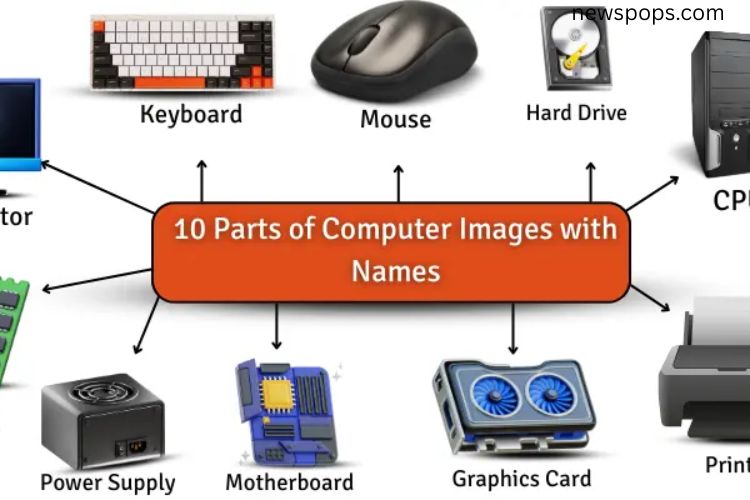
A computer Features is made up of multiple components, each playing a vital role in its functionality. Every part contributes to the overall performance, ensuring the system runs smoothly. Some components allow users to input data, while others process or store information. Output devices display results, making interactions possible. Understanding these parts is essential for both beginners and tech enthusiasts to operate and maintain their computers efficiently.
Read More: 10 Eye-Opening Advantages and Hidden Disadvantages of the Internet – Real-Life Examples Included
Essential Parts of a Computer
Computers rely on a combination of hardware components that work together seamlessly. Here’s a detailed look at the 10 main parts, their functions, and key features.
CPU (Central Processing Unit)
The CPU is often referred to as the brain of the computer. It manages all operations, from opening applications to processing complex tasks. When you play a video or run software, the CPU ensures everything works quickly and accurately.
Features of the CPU:
- Compact but highly powerful
- Operates at extremely high speeds
- Contains millions of tiny circuits
- Can have single, dual, or multiple cores
- Connects to all components via the motherboard
Monitor
The monitor displays all visual output from your computer. Whether you are browsing, gaming, or working, the monitor translates data into images and videos you can see.
Features of the Monitor:
- Flat or curved screen designs
- High-quality color display
- Available in various sizes
- Types include LCD, LED, or touchscreen
- Connects via cable or wirelessly
Keyboard
The keyboard is the primary input device for typing letters, numbers, and symbols. It allows users to write documents, search online, or interact with software.
Features of the Keyboard:
- Contains letters, numbers, symbols, and function keys
- Available in wired or wireless versions
- Some have backlights for dark environments
- Comes in mechanical or membrane types
- Includes shortcut keys for faster actions
Mouse
A mouse controls the pointer on the screen, allowing users to click, drag, and interact with programs. It is essential for navigation and gaming.
Features of the Mouse:
- Ergonomic and easy to handle
- Available in wired and wireless models
- Equipped with buttons for clicking
- Some have scroll wheels for navigation
- Can use optical or laser sensors
Hard Drive
The hard drive stores all your data, including files, games, and documents. It preserves information even when the computer is turned off.
Features of the Hard Drive:
- Large storage capacity
- Internal or external options
- Available as HDD (Hard Disk Drive) or SSD (Solid State Drive)
- Keeps files safe over long periods
- Essential for system storage and backups
RAM (Random Access Memory)
RAM temporarily stores data that your computer is actively using. It speeds up operations, allowing programs and games to run efficiently.
Features of RAM:
- Boosts system speed
- Temporary memory, active only while the computer is on
- Comes in various sizes (4GB, 8GB, 16GB, etc.)
- Essential for multitasking and gaming performance
Power Supply
The power supply delivers electricity from the wall outlet to all computer components, enabling them to function. Without it, the computer cannot operate.
Features of the Power Supply:
- Provides consistent power to all parts
- Compatible with different types of plugs
- Available in various wattages (e.g., 300W, 500W)
- Keeps the system stable and safe
Motherboard
The motherboard is the central hub connecting all components. It allows communication between the CPU, RAM, storage, and other peripherals, ensuring smooth performance.
Features of the Motherboard:
- Connects all computer parts
- Facilitates communication between components
- Contains slots for CPU, RAM, and expansion cards
- Controls system operations and compatibility
Graphics Card
The graphics card processes images, videos, and animations, delivering high-quality visuals. It is crucial for gaming, video editing, and 3D rendering.
Features of the Graphics Card:
- Produces clear and vibrant visuals
- Enhances gaming performance
- Has dedicated memory for faster processing
- Essential for creative software and video tasks
Printer
The printer converts digital files into physical copies, making documents and images tangible. It is useful for work, school, and creative projects.
Features of the Printer:
- Prints documents and photos
- Supports color or black-and-white printing
- Some models can scan and copy
- Connects via wired or wireless methods
Frequently Asked Questions:
What are the main parts of a computer?
A computer’s main parts include the CPU, monitor, keyboard, mouse, RAM, hard drive, power supply, motherboard, graphics card, and printer. Each part performs a specific role to make the system work efficiently.
What is the function of the CPU in a computer?
The CPU acts as the brain of the computer. It processes instructions, runs programs, and manages all tasks to ensure smooth performance.
How does RAM affect computer performance?
RAM temporarily stores active data and programs. More RAM allows a computer to run multiple applications faster and improves overall system speed.
What is the difference between a hard drive and RAM?
A hard drive stores permanent data, even when the computer is off, while RAM temporarily holds data for currently running programs and disappears when the computer shuts down.
Why is a graphics card important?
A graphics card generates high-quality images, videos, and animations. It is essential for gaming, video editing, and creative design work.
Can a computer work without a printer?
Yes, a printer is an optional peripheral. Computers can function fully without it, but a printer is needed for producing physical copies of documents or images.
What role does the motherboard play in a computer?
The motherboard connects all components and allows communication between the CPU, RAM, storage, and peripherals, coordinating the computer’s overall operation.
Conclusion
Understanding the parts of a computer is key to unlocking its full potential. Each component—from the CPU and RAM to the graphics card and monitor—plays a crucial role in delivering speed, performance, and functionality. By familiarizing yourself with these parts and how they work together, you can troubleshoot issues, optimize performance, and make informed decisions when upgrading or buying new hardware. Take the time to explore your computer, observe its components, and appreciate how every part contributes to a seamless digital experience. Knowledge of computer parts empowers you to use technology smarter, faster, and more efficiently.