Computers have become an essential part of our daily life. They help us work, learn, play, and communicate by performing a variety of tasks. At their core, computers take input, process data, store information, and provide output. Beyond these basics, they connect to the internet, automate tasks, and even control other devices. Understanding these functions allows us to use computers more effectively and efficiently.
Read More: Ultimate Guide to Computer Mice: Explore Stunning Designs, Powerful Features, and Iconic Models
Functions of a Computer
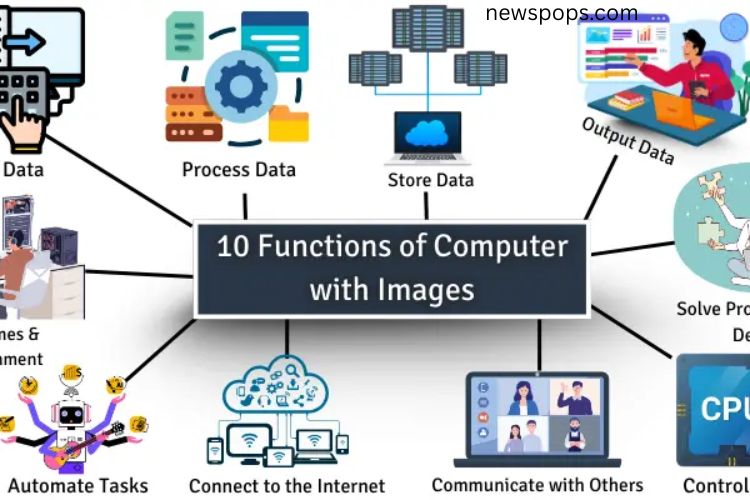
Computers perform many tasks that simplify life and boost productivity. Here are the ten primary functions:
Input Data
Input data is the information we provide to a computer through devices like keyboards, mice, microphones, or touchscreens. The computer relies on this input to execute tasks. Without input, a computer cannot function.
Example: Typing a message on your phone provides input data. The device processes it and displays the message on the screen.
Process Data
Data processing transforms raw data into useful, understandable information. Computers organize, calculate, and analyze data to help users make decisions and perform tasks accurately.
Example: Using a calculator to add numbers converts your input into a result quickly and efficiently.
Store Data
Computers save information on hard drives, cloud storage, or external devices. Stored data can include documents, photos, videos, and other files. Storing information ensures it’s safe, accessible, and frees up temporary memory for other tasks.
Example: Photos saved on your phone can be accessed anytime in your gallery, just like files stored on a computer.
Output Data
Output data is the result displayed after the computer processes input. This can appear on screens, printers, or speakers, showing text, images, sounds, or other formats. Without output, users wouldn’t know the results of their commands.
Example: Searching for a video online displays a list of results. The computer processes your request and outputs the relevant content on the screen.
Control Unit
The control unit acts as the brain of the computer’s operations. It directs the CPU, manages tasks, and ensures all components work together seamlessly. Without a control unit, the computer cannot function efficiently.
Example: Like a teacher guiding students on tasks, the control unit organizes and coordinates computer operations.
Connect to the Internet
Internet connectivity allows computers to access vast online resources. Users can browse information, communicate, share files, and enjoy entertainment. The internet also provides real-time updates on news, social media, and other services.
Example: Searching for a school project online requires the computer to connect to the internet to gather the necessary information.
Play Games and Entertainment
Computers provide endless entertainment opportunities. Users can play games, watch movies, listen to music, or stream content. Modern computers enhance fun and relaxation with high-quality graphics and immersive experiences.
Example: Playing a game like Minecraft allows users to explore, build, and interact creatively, making it a popular choice for entertainment.
Automate Tasks
Computers can perform repetitive tasks automatically, saving time and reducing errors. Automation is widely used in industries, homes, and workplaces to increase efficiency and productivity.
Example: Washing machines operate automatically once started, completing cycles without manual intervention. Similarly, computers automate complex tasks in business and engineering.
Communicate with Others
Computers simplify communication by enabling emails, video calls, instant messaging, and social media interactions. They allow users to share files, pictures, and ideas instantly, even across the globe.
Example: Video calling a friend in another country allows real-time interaction, while sending documents or images takes just seconds.
Solve Problems and Make Decisions
Computers help analyze large amounts of data, identify patterns, and provide solutions. They assist in decision-making, planning, and problem-solving by offering accurate and fast insights.
Example: Planning a school event becomes easier with a computer. It can calculate costs, organize schedules, and suggest the best options, helping you make informed decisions
Frequently Asked Questions:
What are the main functions of a computer?
A computer can input, process, store, and output data. It also connects to the internet, automates tasks, supports entertainment, facilitates communication, and helps solve problems.
How do computers process data?
Computers take raw information from input devices, organize and calculate it, then convert it into useful, actionable output like text, images, or results.
Why is data storage important in computers?
Data storage keeps files, documents, and multimedia secure and easily accessible. It also frees up memory for processing other tasks efficiently.
How do computers help with communication?
Computers enable emails, video calls, instant messaging, and social media, allowing users to connect and share information worldwide in real time.
Can computers automate tasks?
Yes. Computers can perform repetitive tasks automatically, such as calculations, scheduling, or machine operations, saving time and reducing human errors.
How do computers support entertainment?
Computers provide access to games, movies, music, and streaming platforms, creating immersive and interactive entertainment experiences.
What role does the control unit play in a computer?
The control unit directs the CPU, coordinates all components, and ensures tasks are executed in the correct order for smooth operation.
Conclusion
Computers are more than machines—they are powerful tools that transform the way we live, work, and communicate. By handling data input, processing, storage, and output, they simplify complex tasks and make information accessible at our fingertips. Beyond basic functions, computers empower us through automation, entertainment, problem-solving, and global connectivity, revolutionizing both personal and professional life. Understanding these functions not only helps us use computers more efficiently but also allows us to unlock their full potential, enhancing productivity, creativity, and innovation in today’s digital world.