Computers have become an essential part of our daily lives. From helping students complete homework to running complex scientific simulations, computers vary widely in size, power, and purpose. Understanding the different types of computers can help you choose the right one for your needs, whether for personal use, business, or advanced research.
Read More: Delightfully Fun & Imaginatively Magical Names for Your Beloved Snowman Companion
Microcomputers (Personal Computers)
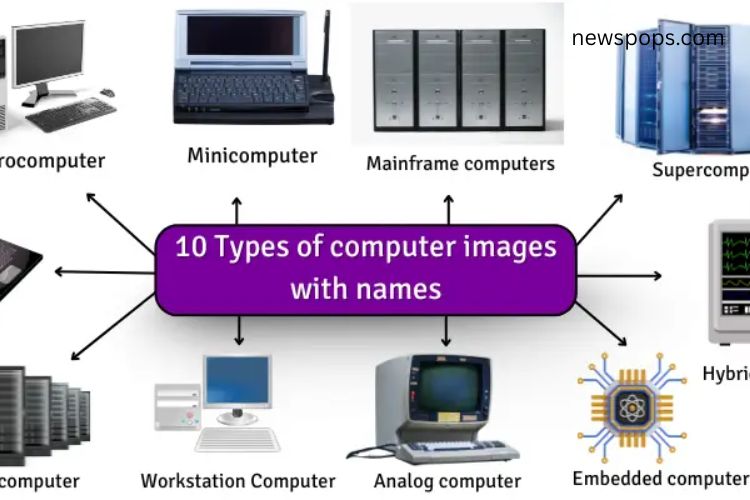
Microcomputers, commonly known as personal computers (PCs), are compact and affordable, designed for individual use. Laptops also fall under this category.
Characteristics:
- Small and portable
- User-friendly
- Cost-effective
Uses:
- Completing school or office work
- Internet browsing
- Gaming and multimedia activities
Minicomputers
Minicomputers are mid-sized systems, larger than microcomputers but smaller than mainframes. Examples include the PDP-11 and Data General Nova.
Characteristics:
- Medium in size
- Supports multiple users simultaneously
- Cost-efficient
Uses:
- Industrial automation and factory operations
- Hospital management systems
- Business applications
Mainframe Computers
Mainframes are large, powerful machines capable of handling thousands of tasks simultaneously. They are common in banks, airports, and government organizations. IBM Z-series is a popular example.
Characteristics:
- Multi-user capabilities
- Large and robust
- Expensive but reliable
Uses:
- Banking transactions
- Airport management
- Government and enterprise data processing
Supercomputers
Supercomputers are the fastest and most powerful computers, designed for highly complex calculations. Examples include Summit and Fugaku.
Characteristics:
- Exceptional processing speed
- Massive size
- Very costly
Uses:
- Weather forecasting
- Scientific research and simulations
- Advanced engineering calculations
Server Computers
Servers are specialized computers that store, manage, and share data across networks. Examples include Dell PowerEdge and HP ProLiant.
Characteristics:
- Powerful with high storage capacity
- Supports multiple users simultaneously
Uses:
- Hosting websites
- Data storage for companies and institutions
- Managing email and internal communication systems
Embedded Computers
Embedded computers are small systems integrated into other devices to perform dedicated functions. They are found in cars, appliances, and mobile devices.
Characteristics:
- Compact and purpose-specific
- Low power consumption
Uses:
- Controlling car engines and brakes
- Operating home appliances
- Managing mobile device functions
Workstation Computers
Workstations are high-performance computers designed for professional tasks requiring speed and precision. Examples include Apple Mac Pro, Dell Precision, and HP Z Series.
Characteristics:
- High processing speed
- Large memory capacity
- Superior graphics performance
Uses:
- 3D modeling and design
- Video editing
- Scientific data analysis
Laptops
Laptops are portable computers that combine the functionality of a PC with mobility. Examples include HP Spectre and Dell Inspiron.
Characteristics:
- Lightweight and portable
- Built-in keyboard and screen
- Battery-powered
Uses:
- Typing and document creation
- Streaming videos and browsing the internet
- Remote work and study
Analog Computers
Analog computers process data using physical quantities such as voltage or resistance. They are ideal for measuring real-world phenomena like speed and temperature.
Characteristics:
- Uses continuous data
- Fast for specific applications
Uses:
- Monitoring temperature and speed
- Controlling machinery
- Engineering calculations
Digital Computers
Digital computers process information using binary numbers (0s and 1s). This category includes most modern computers such as laptops, desktops, and smartphones.
Characteristics:
- Fast and accurate
- Stores and processes data efficiently
Uses:
- Gaming
- Office work and documentation
- Internet browsing
Hybrid Computers
Hybrid computers combine features of analog and digital computers, offering flexibility in processing different types of data. Hospital patient monitors are a common example.
Characteristics:
- Combines analog and digital processing
- Handles diverse data types
- Fast and versatile
Uses:
- Monitoring patient health
- Space exploration
- Weather prediction and simulations
Frequently Asked Questions:
What are the main types of computers?
Computers are categorized by size, purpose, and performance. The main types include microcomputers, minicomputers, mainframes, supercomputers, servers, embedded systems, workstations, laptops, analog, digital, and hybrid computers.
What is a microcomputer?
A microcomputer, also called a personal computer (PC), is small, affordable, and designed for individual use. Examples include desktops and laptops.
How is a mainframe different from a supercomputer?
Mainframes handle large-scale, multi-user tasks like banking or airport management, while supercomputers focus on extremely fast calculations for scientific and engineering purposes.
What is an embedded computer?
Embedded computers are small systems integrated into devices to perform specific functions, such as controlling car engines, microwaves, or smartphones.
What is a hybrid computer used for?
Hybrid computers combine digital and analog functionalities. They are used in hospitals for patient monitoring, weather forecasting, and space missions.
Are laptops considered microcomputers?
Yes, laptops are a type of microcomputer designed for portability without sacrificing the core functions of a personal computer.
Which computer is the fastest?
Supercomputers are the fastest computers, capable of performing billions of calculations per second for complex simulations and research.
Conclusion
Understanding the different types of computers is essential in today’s technology-driven world. From compact microcomputers and versatile laptops to powerful mainframes and supercomputers, each type serves a unique purpose and meets specific needs. Embedded, hybrid, and workstation computers further expand the possibilities, enabling advanced functionality in everyday devices and professional environments. By exploring these computer types, you can make informed decisions, whether selecting a device for personal use, business operations, or scientific research.